Project Overview
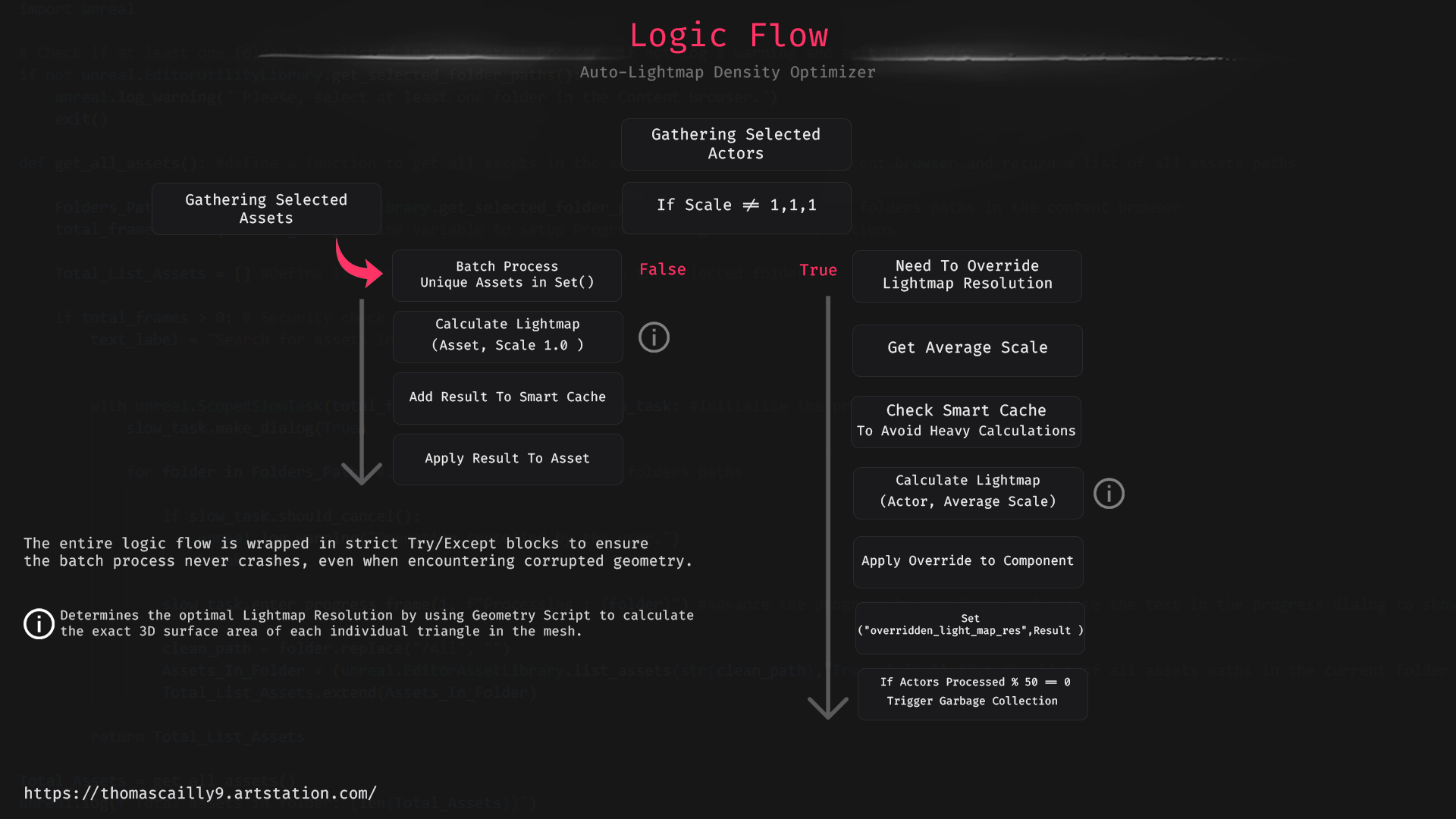
Relying on bounding boxes to determine Lightmap Resolution often leads to inaccurate texel density and bloated baking times. To solve this, I developed a Python-based automation tool in UE5 that calculates the mathematically ideal resolution based on true 3D surface area.
Recently stress-tested in a production environment: Processed over 19,000 level actors and 350 unique assets in just 40 seconds without memory leaks.
Technical Stack
- Engine: Unreal Engine 5
- Language: Python
- Key System: Geometry Script, Built-in Automation
- Optimization: O(1) Dictionary Caching, Modulo-based GC
Image Gallery

← Scroll horizontally to view more →
Technical Breakdown
1. Algorithmic Precision
Relying on bounding boxes for Lightmap Resolution is flawed.
Solution: The tool leverages UE5's Geometry Script to extract LOD0 geometry,
iterating through the mesh triangles to compute the exact 3D surface area before snapping the
result to the nearest power of two.
2. Scalability & Memory Management
RAM saturation becomes a risk when loading hundreds of assets during heavy batch
processes.
Solution: Implemented a modulo-based Garbage Collection system during heavy
batch processes to prevent memory leaks and RAM spikes when optimizing large levels.
3. Smart Caching
Re-calculating heavy geometry for instanced meshes wastes vital CPU time.
Solution: Heavy geometry computations are cached in Python dictionaries (O(1)
lookups). If an instanced mesh is encountered again, the script retrieves the pre-calculated
resolution, drastically reducing execution time.
4. Edge-Case Handling
Assets often have complex scale settings or property inheritances.
Solution: The script accounts for property inheritance. For actors with a
uniform scale (1,1,1), it automatically disables component-level overrides to force inheritance
from the newly optimized base Static Mesh, while correctly applying custom overrides to scaled
instances.
5. Pipeline Context (Limitations)
Even perfect math won't fix bad art input.
Solution: As with any automated pipeline step, the "Garbage In, Garbage Out"
rule applies. While this tool perfectly automates the mathematical density, the final bake
quality will still be compromised if the 3D artists provide stretched or overlapping Lightmap UV
layouts (Channel 1). The tool handles the math so the artists can focus on clean unwrapping.